
Introduction (since v4.5)
Version Note
Starting from v4.5, Bean Searcher provides the Bean Searcher Exporter component. It enables direct data export from a SearchBean to a file.
Data Export
The export system provides memory-efficient, streaming data export for BeanSearcher. It supports streaming large datasets to files (CSV by default) with built-in concurrency control, adaptive database load management, and expression-based field transformation. The exporter fetches data from the database in batches via BeanSearcher, processes each batch with configurable transformations, and writes it to the output stream — without loading the entire dataset into memory at once.
Architecture
The export system consists of several loosely coupled components that work together to provide flexible, high-performance data export:
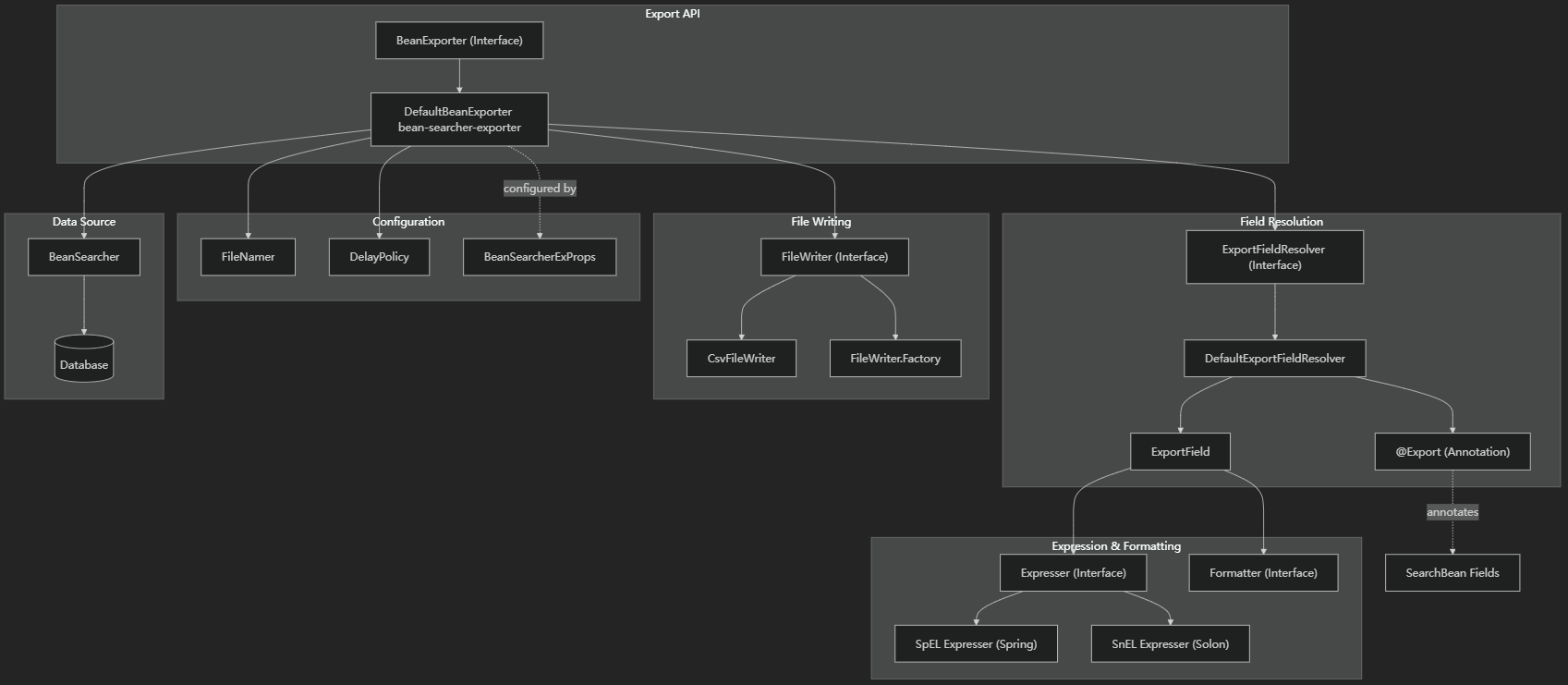
Quick Start
Step 1: Add the Dependency
Add bean-searcher-exporter alongside your existing bean-searcher-boot-starter (or bean-searcher-solon-plugin):
implementation 'cn.zhxu:bean-searcher-exporter:4.8.12'<dependency>
<groupId>cn.zhxu</groupId>
<artifactId>bean-searcher-exporter</artifactId>
<version>4.8.12</version>
</dependency>Step 2: Annotate Fields with @Export
Add @Export to every field you want to include in the export file:
@SearchBean(
    tables = "order",
    maxSize = 2000,             // must be >= batchSize (default 1000)
    maxOffset = Long.MAX_VALUE  // allow full-table export
)
public class OrderExportVO {

    @Export(name = "Order No.", idx = 1)
    private String orderNo;

    @Export(name = "Buyer Name", idx = 2)
    private String buyerName;

    @Export(name = "Order Time", idx = 3, format = "yyyy-MM-dd HH:mm:ss")
    private LocalDateTime createTime;

    @Export(name = "Amount (USD)", idx = 4, format = "#,##0.00")
    private BigDecimal amount;

    // getters / setters omitted
}
Step 3: Inject BeanExporter and Export
@RestController
public class OrderController {

    @Autowired
    private BeanExporter beanExporter;

    @GetMapping("/order/export")
    public void export(@RequestParam Map<String, Object> paraMap) throws IOException {
        // One line — data streams directly to the browser as a file download
        beanExporter.export("orders", OrderExportVO.class, paraMap);
    }
}
No Need to Touch HttpServletResponse
The framework automatically obtains the current HttpServletResponse, sets the appropriate headers (Content-Disposition, Content-Type, etc.), and writes the CSV stream into the response output — all you do is call export(...).
Component Overview
| Component | Description |
|---|---|
@Export | Field export annotation — defines column name, order, expression, format, and condition |
BeanExporter | The core exporter interface with multiple overloaded export methods |
FileWriter | File output interface; includes the built-in CsvFileWriter |
Formatter | Formats values as strings (dates, numbers, and general strings) |
Expresser | Evaluates field transformation expressions (SpEL / SnEL) |
DelayPolicy | Controls the inter-batch delay to protect database load |